Showing posts with label Starting. Show all posts

Tuesday, June 04, 2013

Genealogy Checklist For Beginners!

So you want to work on your family history and you're looking for a  checklist of what exactly to do to find someone - including where to  search and what to look for, step by step by step - check check check.   Right?

Well, truth be told genealogy isn't an exact science.  There  are different documents in different places, some have been lost, some deliberately destroyed, others accidentally destroyed, others  haven't bee made public, names changed, nicknames got used instead of real names, people lied on documents, places changed, governments  changed, languages changed....you get the picture.

Every family tree is different and every genealogist has a different focus and a different set of problems because you're searching for INDIVIDUALS.  And there have been about 107,000,000,000 (One hundred seven trillion) individuals with different life stories and migrations and countries and parents and histories and careers and documentations lifespans across the planet.

So your checklist?

Other than some general research guidelines...it doesn't really exist.

HOWEVER - I could break Genealogy down into three areas of knowledge:
  • Sources of info
  • Organization & Documentation
  • How to interpret info


Once you get organization down you'll have that forever, don't need to keep learning it.  That's pretty simple.
How to interpret info is fairly standard with variations depending on areas and time periods and once you got that down you're pretty on top of things.
The last is sources of info.  That's ongoing depending on who you're researching when and where (i.e. you aren't going to look in the Beverly Massachusetts courthouse for records for Multnomah County Oregon) and you'll have the help of the Holy Ghost in many instances on this one.  But there are some pretty standard sources that don't require extensive information down once you got the basics down.   This doesn't have to be overwhelming!  

If I was going to write a genealogy checklist for a beginner it would be this:
1) Learn the basics (This website is a good place to start)
2) Start with yourself
3) Focus on one family or individual at a time (Take your time!)
All in a days work....or millenia

4) Go after the low hanging fruit
5) Keep learning
6) Take your time and HAVE FUN!

If you're not having fun you're doing it wrong. You will be much more successful if you have the spirit and that's much easier if you're having fun. A little bit here, a little bit there.  Rome wasn't built in a day. Trees don't grow over-night.

My advice though? Pray for help from the Lord and seek His guidance in doing this work and I testify you will be blessed and find the help you need through Him and will come to understand this work much faster.

Friday, December 21, 2012

Valid / Reliable Sources and Info

What constitutes valid and reliable info and research in genealogy?

This is where YOU have decisions to make.

For YOUR family tree, YOU have to prayerfully decide whether YOU consider a source of information reliable and valid based on what you have learned in your history in many instances and the Spirit can help you with this. 

So in terms of submitting ordinances for the temple, regardless of whether you submitted George Washington to be sealed to your mother and claimed George lived in our day, cool as that might be, even with the priesthood it wouldn't be a legitimate sealing.

However, given the importance of the temple ordinances and the given that not everything is documented and some things can be known from family histories and stories, the church doesn't require extensive documentation for an ordinance to make sure its valid. Yet.  

Regardless, your family tree wouldn't be very reliable nor would it be valid either.

So what does make info reliable and valid?

Usually with genealogy we are dealing with documents on paper (sometimes etched in stone, or worth a thousand words at a time in a photograph).  There usually is more than one piece of info we can obtain from an ancestor on a piece of paper and more than one should match other documents' info, or we should have verified more than one before we can look at a document and say "YUP! That's him!"

For example, lets say you're looking for Jim Jones in documentation and you know nothing else about Jim Jones other than his name.  Nothing.  If that's all you have, I would say you don't have enough info to do any research on the individual anyways - you've got a rumor if even that, not a person.

But you can't then pick up a census from any time period or location and find a Jim Jones and say "YUP! That's definitely him!"  Or find Jim Jones on forty censuses around the country and say "Man, Jim really got around!"

However, if you knew Jim Jones was
  • born on July 7, 1957 
  • in Portland, Multnomah, Oregon 
  • as the adopted step-son 
  • of  Tim and Fredricka Jones 
  • and born at Emmanuel Hospital 
  • and resides on Creekside Court in Milwaukie, Oregon 
  • and graduated from Milwaukie High School in 1975 
  • and did a stint in the US Navy as a Machinists Mate 
  • on the USS Belleauwood from 1975-1979 
  • and now works for Intel

and you found a photograph of a guy at a circus in black and white with the sole label on it of "Jim Jones" you still wouldn't say "YUP! That's him! Found a picture of my uncle!"

Or if you found a circus-ticket stub attached to a crayon colored drawing with "Jim Jones" scribbled at the top - similarly you wouldn't say "YUP! That's him! Found my uncle's art-work!"

Now if you found a photo with a caption, "Jim Jones with mother Fredricka and father Tim at Portland Circus, 1967, age 10" You might go, "ah....maybe we got something."

The example highlights a few things: the amount of info as well as the nature of the document itsself.  Not all documents are "equal"in this work.

And a few pieces of info should match up between what you know and what you're looking at/for.

If you know that Jim
  •  was born in Oregon, 
  •  and his mother was born in Germany in the 1930's 
  • and his father in the Soviet Union in the 1930's, 

and you find a census for Oregon that lists him as
  • a step-son 
  • born in Oregon
  • and his parents as Jones, T. and Jones F. 
  • and his parents as being born in Germany and USSR, 
  • and him being 2 years old on a 1960 census (even though those aren't released yet - humor me)

then I'd say you've possibly got the right person.  

If they were born in Indiana and Michigan and the census says Iowa and Michigan, I'd still say "close enough, I think this is it."

Now if you find an individual who matches all these details and you find something related to them being a paraplegic at the state mental hospital and you know they joined the Navy, despite those details adding up, the last three details are disqualifiers.

In short, you have to pay attention and slow down a bit and take your time.

  • Also, are you looking at an original of the document or a transcription?  
  • Are there sources to the transcription/document? 
  • Sources to the story?

It takes some time to get used to working between ten documents and putting that kind of information together in your head, but you get used to it.

Speed will come in time as you come to know who you're working with and learn trends and nuances that are common to the work.  

In the end for your family tree - YOU have to prayerfully decide and consider and I testify, the spirit will help, can help and does help in this work as it is very important. This is by no means complete, but it gives you an idea and an overview of what to consider in this work.

Enjoy the journey and take in the scenery


Thursday, December 20, 2012

Temple Submissions: REQUIREMENTS!

The amount of information required to submit an ordinance to the temple is very little actually.

They are:
  • A name. Not even a full name.  A first initial with a last name is really all that's required. 
  • Approximate date and location of one life event (preferably birth)
  • Gender
That's it!

 Input that into Family Tree and you're good to go!


If you get to family photos like this...stop going.  You're in the 1500's.
It is not required but it is helpful if you have a source for your info and can document how you know the information - memory of someone, family bible, census, birth certificate, grave stone, history compendium etc.)

Now obviously the more info and life events you have the better because you can be sure you're working with the right person and not submitting invalid work.

It helps when you have a death date as well because then you know if you need to look for a marriage possibly, or if you even need to do a baptism.  If they died before age 8 this isn't necessary and Family Tree won't let you do it.  But if you don't have the info of a death, then you can submit it, but you could be submitting an unneeded ordinance.  However, given the nature of genealogical research, obtaining a death date isn't always possible so it isn't required.

Except for a few well documented lines of royalty – most genealogy sources, documentation and resources are  considered unreliable or in-valid before 1500. Generally you will run into issues with Family Tree trying to enter new data from before 1500 for this reason as it won't let you do it without requesting special permission.

Once you've submitted your work to Family Tree you have two options: 1) do the ordinances yourself or 2) release them for others to do.

The general authorities have asked us to have ordinances performed in "a reasonable amount of time" - in other words if you can't do them in "a reasonable amount of time" release them for others to do. 

It is not advised to hold onto a multitude of ordinances that you will not be able to perform yourself because this work needs to be done and the amount of work that needs to be done is immense.  The more work that is done allows other work to be done through the veil and into our lives and extends blessings around the world.   My personal recommendation is to hold onto those that are closest to you and allow others to be blessed by your work around the world as you submit it.  I may hold onto a few names for my trips to the temple but generally as soon as I submit them I release them to the temple to free more people up through the veil to help with the work.

Genealogy Tip: FOCUS!

Genealogy is not an exact science.

You will have to look for clues and be open to possibilities and “develop leads.”  You'll run into “dead ends” and even have “cold cases” that lie for years before something comes up that you need. Other times you'll have fantastic finds and treasure troves of success!

To make work easier – focus on one family at a time. Meaning, one set of parents and their children at a time, or one individual.  It's very easy to go “hog wild” and run down roads of links and get lost in the work and end up with a mess you can't sort out.

As you find info, you're going to come across other branches of family.  Save them as you come across them but keep focused on the family or individual you're working on so that you can complete your work.  Take your time to verify your work and document it in your family tree software as you go.

Meanwhile, don't get so hung up on an elusive/difficult individual that you completely stop working on your family tree.

Some info may not be available yet.  Sometimes you'll need to take a break. If you feel like you're not having success, set that person aside and try someone or something else!

Think Outside the Box!!!
Some branches of family history are going to be easier to track and find than others.
The easiest records to find are those of white, male property owners, government officials, of royal descent or historical figures.

Meanwhile, often in genealogy there's a tendency to focus on “Going back.” Don't forget you can also branch out to the sides and come back to the future – or at least the present! Marriages, cousins, in-laws, all are part of your family that you can add to your tree!  Don't get totally hung up on just “going back.”


Getting (and keeping) Organized in Genealogy!

You're going to be dealing with a TON of paperwork, photos, documents and files (if you aren't already) you need to keep organized .

It won't take long before you see how organization is critical to your success in family history.

What follows are my recommendations for keeping organized in your work:

 Step 1:Choose a software program to do your work in.  Previously the church used Personal Ancestral File (PAF) however, that has largely gone by the wayside.  I recommend spending a few dollars on a bit of software to work on your family tree on, or you can download a free version (I prefer Legacy Family Tree Software because it is visually the most friendly of the ones I have tried using for me, but you be your own judge).  Some software sites are located on the right of the screen as well as a link to compare software kits.

Step 2: BACK UP YOUR WORK! NOW!
(Not after you lose it) I have several hard drives attached to my computer.  When I finish doing work on a session, I copy it to one of the other hard drives every time.   You're going to put a lot of work into this and re-doing it can be exhausting – sometimes impossible!! You can also set up a separate email account and email yourself your work from one email to the other when you're finished so your work is also stored online.  I've already had a hard drive crash and would have lost hundreds of hours of work had I not backed it up.

Additionally, there are cloud storage services you can subscribe to as well to move files off your computer hard-drive, and even Google has Google Drive with free limited (but pretty darned large for getting started) storage for your genealogical files.

 
Organizing Files
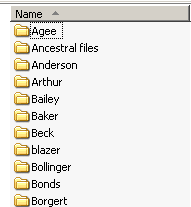
You're going to be dealing with multiple families with their own files.  Every time I start a new branch of the family tree I create a folder with that last name of the branch – i.e. Wilson, Millican, Smith, and so on.  I save any files related to that family in that folder so it is always easy to find.  Files related to unmarried women go under their maiden name.  Once they marry, I file under their married name.  If you wish to make folders for countries or states to further consolidate your work, that may help as well.


"Original" Sources
Any time I come across a source of information on the internet – if I can save a picture of it or take a screen-shot of it - I do.

Its faster, easier and more reliable than transcribing and taking notes.  I don't make mistakes, nothing gets forgotten or lost, everything that was in the source is now saved.


Sometimes the source won't be an image but you will want to make an image of it. An example would be a Death Index record off Ancestry.com

1) Open a paint program such as Microsoft Paint.

2) Go to the image you want to save on your screen and press CTRL+PRINT SCR(Control, Print Screen)

3) If needs be, expand your screen by pressing F11, press F11 when you're done to return the screen to normal

4) Go to the paint program and press CTRL+V (Paste) and paste the screen shot in there. 

5) Crop and save it so you have a screen-shot of the original.  VOILA! Original info – no errors made by you and was done quickly!

IMAGE FILES
There are various formats to save an image in that you create off the web.

When dealing with documents, detail is critical so you can decipher ancient handwriting.


 DOCUMENTS
When scanning and uploading your own documents, scanning in a .pdf format is preferred.  PDF stands for “Portable Document Format”.

PDF allows certain programs to interact with the text and read the document you scanned.  If possible, it is the ideal format for document scanning.


BMP - Bitmap. This is generally medium-high quality but produces larger file sizes and is good for simpler graphics.  If you save a file in a bitmap image you're likely to lose data.


Bitmap image blown up = loss of data

JPG, JPEG. (Joint Photographic Experts Group). Became popular with the invention of the digital camera.  High quality images and huge compression allows for big resolutions but small file sizes. This is the most common image format, especially for photos (Family photos?).  However, the compression means that some detail is “lost” when you blow it up and this can make reading some documents difficult at close zoom.  However, this is the file you want to use if you have to email stuff because it will compress the picture down so it isn't too large for an email program.

Getting close on JPEGS reveals distortion
GIF. (Graphics Interchange Format - 1987)
This format was created mainly for internet uses, mainly for its small file size, however it has lower quality though it can be used in animation images. I don't recommend saving in this format.
Or doing either of these activities.


 PNG. Portable Networks Graphic. PNGs produce very high quality images with high resolution but do produce large file sizes. There is one file type that has zero resolution lost, but most genealogy programs will allow PNG while not all allow the TIFF file, though this is changing.  If you have to, go PNG in order to upload stuff, but otherwise.....
pretty....

TIFF - Tagged Image File Format - zero loss, largest file size, but ideal for genealogy so you don't lose any info.

prettier!


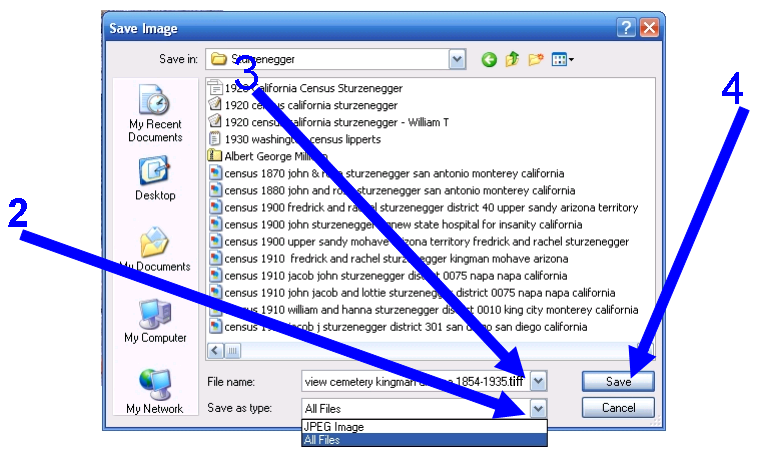
 I would recommend saving images in the TIFF format, but for this demonstration, if you don't know, here's how to save an image in TIFF (same for PNG, or JPG, or BMP)

To save an image in TIFF:
1) Right-click on the image and then click “Save image as.”
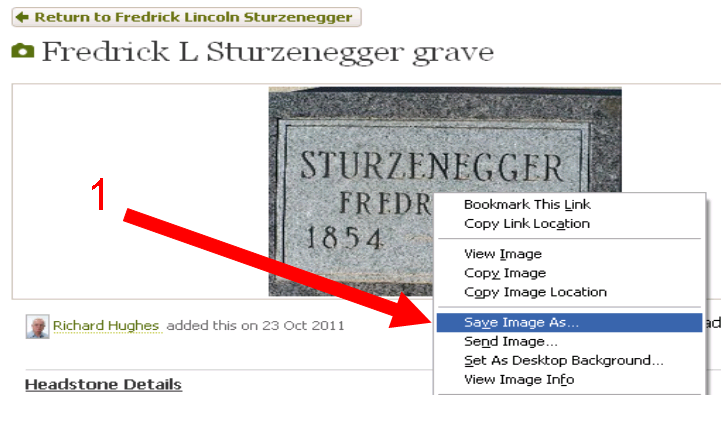
2) On the file type select “TIFF Image” and click “save”- if this is not possible, select “All Files”
3) Name your file and put the extension “.tiff” on the end of it
4) click “Save.” VOILA! High quality image saved! It won't be higher quality than you got it – but you won't lose much data either.


NAMING FILES!!!!
Some types of files are going to be more common than others such as censuses, draft cards, obituaries, marriage certificates etc.

When you accumulate a large amount of work, being able to quickly find what you're looking for is necessary, so standardizing the names of your files so you can quickly find what you need will help significantly.

Here's one way to do it.

Say you have a census from 1900 for a husband (George W. Sebecki) and his wife & you know her maiden name (Amelia M. Neugebauer) and where the census was taken - you might name the file thusly:


  • Census 1900 George W and Amelia Magdalene Neugebauer Sebecki and family, District 32, Portland, Multnomah, Oregon, Unitedstates.tiff

Now you know what, when, where and who is in the file without even having to open it and can verify that Amelia was alive with George in 1900 in Portland and can do "research" from your files without even having to open them up to look at them! (note the file extension names with the documents).

A draft registration?

  •  WWI Draft Registration George Sebecki Dallas, Polk, Oregon.tiff

Obituary?

  • Obituary William Burton Millican 1953 Oregonian Newspaper Portland, Multnomah, Oregon.tiff

Marriage?

  • Oregon marriage index 1946 Albert and Arlene Hazel Lippert Millican, Portland, Multnomah, Oregon.tiff

Then when it comes time to search for a particular file, date, individuals, you can quickly scan your files to find what you need!


Here's an example of my files:


As you find people and are able to document the information sufficiently and verify it, enter it into your family tree software.  Some programs will allow you to attach photographs and documents to the trees as well, though I found this sometimes troublesome if I had to use the program from another disk, the software couldn't find the location of the files, so I just quit attaching them and kept saving them and storing them as mentioned earlier.
 
Original Sources (Books, Certificates, etc.)– Hard Copies!
I don't do as much research from original sources as much now that things are digitizing and people are scanning and indexing them. However, if you do get information from an original source or can scan a document from it, make sure your files or notations include:Title, Author, Publisher, Year, Volume,Page and where you got the source in case you need to go back so you can quickly locate the original or corroborate it if needs be.If the source is a book such as “Families of New England: 1620-1750” note where the author's source is from the back of the book for their info.   This isn't just for you.  You're going to get to a point where others start asking you for copies of your research so you're going to be helping others as well.  Treat it like a college bibliography and document your sources!!!!

Name your file just as you would any other file so you can find it.

Beware that photocopying documents/items can damage them and exposes them to chemicals which can be harmful to delicate documents - whereas scanning only occurs once and the data is more easily duplicatable.  If possible - SCAN!

Consider making a timeline/chronology to keep yourself organized.  Most genealogy software programs will generate a timeline for you.  Consider putting world events in your timeline to help you gauge the political winds and trends that can be a clue in further research.  It can also help you keep track of where you are. This can be done by hand until you figure out where you want to go with software and such if you desire.

CHECK CHECK CHECK CHECK CHECK!!!!
I do not recommend putting anything in your family tree as hard fact that you haven't had a chance to verify and prayerfully consider yourself.  You will find people online often put dates, locations and names but don't cite a source or verify their own work.  You can use their dates and information to check and conduct your own research, however, I find often the information is incorrect.  Even if I find the work has been done before I got there, I check their sources to verify the work before I move on.  This can be a major help to organization because, believe me, going back to undo work makes for a very disorganized mess.

Genealogy Sources & Resources

So you've started with yourself and are ready to branch out!   Now, what?  Where?  WHO?

Well, the "who" and "what" are up to you.

Who do you want to work on?  Who do you feel you should work on?  Who is going to be the easiest?

There's tons of genealogy to go around, and in terms of getting ordinance work done, I always recommend starting with the easiest people first - the ones who have the most info on them. Start with prayer.

Then when you have decided that, working on the internet is one of the easiest places to start that allows the most work for the least effort.  Although there are times when gathering actual research is necessary and desirable, internet research is one of the easiest places to start.

First you need to know there are holding periods on certain documents that you won't easily have access to right away - for example, censuses are released 72 years after they've been compiled. In the State of Oregon, all birth records have a 100 year restriction on them, meaning unless they were born 100+ years ago, you won't be able to get them, and death records have a 50 year restriction on them. (Click here for other states' rules)  Neither of those are really a problem because we can't submit names for those born less than 110 years ago unless we are the closest living relative.

So where do we start?  All of the following links are on the right of the page so you don't have to go through here again to find them.  I recommend bookmarking these on your web browser to make it easier to find them and use them.


Probably the best and most versatile resource for family history that you will pay for.  An excellent investment. Costs ~$150/year or ~$23/month for access to US records, more for overseas (But VERY worth it!!!! Every penny!) Available for free at LDS family history centers.
*Allows you to download photographs of documents
*Order copies of the original documents
*Print documents
*Link to others' works on your family tree
*Create a family tree others can see online.


New Family Search often will have links or trees of you family already completed by others who've done work before you.  There are also a host of other records available for free.

While I find I upload more into New Family Search than I download, I have had some fantastic success with New Family Search – both on the research side and on the temple records side. To access the research side click “Family Search Web Site” on the main page.


Rootsweb is primarily a message/research board that allows genealogists to connect with one another and post info.  Great place when you're stumped to post a question and find some info, also you can sign up for mailing lists by surname so you are notified anytime someone has a find related to a particular family/branch/name.


More information than you can possibly sort through.  (HUGE!  You *will* get lost in here it's so large and comprehensive and huge and huge and huge and huge and HUGE!)‏ Free – BUT may cost money to access links. It links to the resources that store the info you're looking for – (e.g. Maryland Vital Records, Tillamook County Historical Records, personal published family trees)

The United States Newspaper Program is a cooperative national  effort among the states and the federal government to locate, catalog,  and preserve on microfilm newspapers published in the United States from the eighteenth century to the present.  Your local library may have collections of newspapers as well.  Definitely try the Multnomah County Library link at right.


OBITUARIES – Obituaries are an excellent source of info as they list churches, family, occupations, where born, where died, years of immigration and much much more! land recordedStuck?  Try an obituary! Definitely try the Multnomah County Library Link at the right.


LAND RECORDS!  Land records can help you establish time lines of residence, and other family life events & locations including schools, cemeteries, work – you name it!  People “lived” around where they lived! Got one of your immigrant family members who claimed they came to the US to meet a brother on 5th street in Chicago that nobody can find anything on? (I do!) Land records can help you with things like this! (Heck, you can build a legacy just off land records alone!)


The National Archives specifically has veterans records on file that you can request.  You can order medals – you name it!  In addition there are other genealogical resources, historical documents and more.  Another invaluable resource to use online or at one of the centers (If you're near DC, Atlanta or Anchorage).

There are no records of Indian genealogy before American record keeping began.  At some point in your genealogy, if your family has been in the US for any length of time, you're likely to come across a branch going back into “Indian Territory.”  While going “back” may not be possible, you can “branch forward” and “out” - it needn't be a “dead” end.

Looking to find what happened to your family in the civil war?  Civil war records can provide insight into pensions and family benefits and can be an indirect link to other family members.  Also if you can find where someone may have been killed in the war, you might find where they were buried.  You can also find survivor's records and enlistment papers.  A veritable smorgasbord of info!


Daughters/Sons of the American Revolution are lineage based membership organizations for women/men who are descended from a person involved in the American war for independence.  Like other sources, this can be used to establish identity or secure more information to spread your search out.  Given that many revolutionary patriots were first and second generation Americans, these can take you back overseas and provide a missing link!  I've found some impressive pedigree information off of DAR/SAR applications often going back seven and eight generations.


Millions of Americans came to the Land of the Free through Ellis Island.  The Ellis Island Foundation has links to ship passenger lists, immigration lists and records of entry. Operation as an immigration inspection station began in 1892. Wanna find out when someone got here and how they got here, or where they came from and branch back overseas? Try the Ellis Island Foundation!


LIBRARY OF CONGRESS!  
Another resource on just about anything you might like to look up. This can even include historical documentation on notable persons in your lineage who might have records on file here.


Museums, Libraries and Historical Societies.
Many museums and libraries have genealogy libraries in them.  You will often find original documents from local history.  If you call a museum to ask what they have, ask if they know anywhere else to look in your quest.  I've even found artifacts on display that belonged to my family in some museums I've been to! 

 Bring cash to pay for copies, paper or a laptop to take notes, if you have a portable scanner that hooks up to your laptop – that's just fantastic!  Plan on spending some time and go early because you'll probably have to do your research there and you'll get sucked into the work.  Be prepared to make an appointment.  Other times, you'll meet others working on the same family line and can compare notes or the librarian can help you network resources. Often they have many books particular to the genealogy of the region that branch back into other parts of the world.  Some resources are available only at that library and may not be available online, so going to a museum or library can be a worthwhile trip.


Can be used to research topics or garner sources in greater detail on various historical events, places or people.  Statistically said to have fewer errors than Encyclopedia Britannica.  Use it to learn about censuses, towns you are researching, particular names, battles, events - Wikipedia is an amazing resource!


Is a volunteer program to put genealogy resources onto the web to make them easier to find for free.  more links to county, city and state genealogy resource websites for free.

Provides links to the state archives of each state – including adoption records, probate records, you name it!  You may have to pay for the resources once you locate them. But, once you receive a document – scan it – and put it out on the web for others!

And here's where you can put it! Consider documenting your progress on the world wide web and putting your research where others can find it. Blogger will allow you to create a free blog.  I write about progress on my family history, upload photos and other information here that are a bit more difficult to find. It helps me keep track of where I am if I set my genealogy aside for a while.  It also allows me to write things easier than I might be able to otherwise such as stories from my family. (www.blogger.com).

These are just a few of the resources to use and is by no means the end, this is just the start, but it should put you on your way!

Tuesday, December 18, 2012

Getting Started With You! (STEP 1)

to start your genealogy with yourself
Too often people start family history wanting to run down some long-forgotten obscure branch and find long-lost exotic names. Then they get lost, overwhelmed and frustrated and then quit doing the work. You will get there to the exotic and long lost places, I promise.  But looking through archives only reveals a fraction of the info and detail that can be gleaned from living people and memories, and this info often leads to the long lost and undiscovered branches!.

The first step is to start with YOU.  That's a pretty hard and fast rule of genealogy.

Without information from now, going back further is difficult if not impossible in many instances, so forget the fancy software and archives for a moment, those will come. 

SO!

You can even use a notepad or word processor for this part (or a quill pen and ink if you feel nostalgic).

Write down your  name, date of birth, place of birth,  marriage date & place, spouse, children and who you were named after.  Jot down where you've lived, grew up, went to school and worked!

NOW! Mom 'n' Dad too!
Write down your parents' names, their dates of birth, if they are deceased, write down  when and where they passed and if you know where they are buried, write that down too!  Write down their marriage info, where and when, if you have any brothers and sisters, their names, dates of birth, marriages, children, and any where's and when's related to each of these items!

Do you know your grandparents info?  If so, write it down!  If not? Who would know?  How do you get a hold of them?  Ask around your family!

Great Grandpa's Homestead Home....

Can you keep going?   Write down what you know on your great-grandparents as well.    Write down aunts, uncles, cousins, in-laws, step-children, adopted-children, get it all!

All done?  Not yet!  In terms of creating a historical record there is still much to do before you even need to start researching.

Do you have a photograph of where everyone lived?  How about a photograph of where they were married?  Photos of headstones?  Photos of schools?  Photos of work places?  Wedding photos?  No? Go get them or take them yourself! (Fantastic excuse for family outings!)

Newspaper clippings?  Any military records in your family in a box somewhere? Go find them!

Great Grandma's School
Are there any museums nearby with family history in them? Historical places nearby your family was involved with? High school trophies of note at the school or a college thesis on file at the college library?  Visit them! Photograph them! Grab a brochure! (Much of my family is photographed and documented in the Tillamook Pioneer Museum for example and I can see my ancestors' photos on the walls hanging up.)

Almost done!  Time to go talk to those who are still alive and ask them to tell you what REALLY happened and share additional info!

There are TONS of work you can do within your own family that are going to make future work much more successful.

So before you go running off into software and archives and then discover you needed the info you have right now anyways, start where you are!

Click this link to learn how digitize documents and organize your data.

Monday, December 17, 2012

Family History Centers & Getting Started

Getting started in genealogy - or family history is easy.  You don't even have to have a computer, though its admittedly easier if you do.

The church has Family History Centers that are available for research purposes where you can have free access to Ancestry.com as well as a multitude of other resources including help from family historians who can guide you around while you're new.

To find a Family History Center near you - click this link and enter the info requested and a Family History Center will be found for you.

USB thumb drive
If you're going to work from a Family History Center and don't have your own computer, purchase a small USB thumb drive that you can save your work on, I would recommend two, one to back them up on and label them and keep them someplace safe.

I would recommend getting at least two gigabytes for storage of information and pictures.

Or, if you would like to create an email account just for genealogy, Yahoo and Google both have free email accounts you can set up just for genealogy if you wish.

The Family History Centers aren't open all the time, so prepare and plan accordingly!